Posts

Showing posts with the label software-engineering

site down: stackoverflow - example of catastrophic failure (Error handling - fail earl, fail safe)
Image
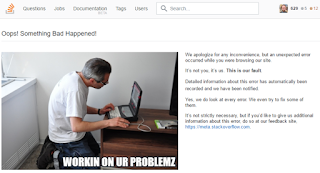
Even the mighty Stackoverlow site has had its share of downtime over the years. site down: an extreme case of preventative catastrophic failure?  In this case, the cause is not known, but could be a sudden maintenance for security reasons, OR a decision to take the site offline when a critical bug was found. The second reason could be an planned example of catastrophic failure - a decision to terminate the program (the web site) in order to prevent entering undefined states that could lead to much more serious consequences such as data corruption, data leakage or security issues. Typically, catastrophic failure is a kind of automatic throwing mechanism, where a program raises an exception to interrupt the current flow of code. However, in extreme cases, a site down state like this could be a manual intervention...
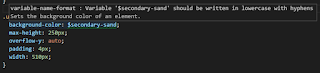
lowercase should be lowercase... - Programming tools, errors and AIAD

Image
Programming is hard! The classic imperative programming model, where the computer performs the exact instructions as given by the programmer, places a huge burden on the shoulders of the all-too-fallible human coder. The problem is one of managing complexity , and one of communication to and from the computer and the human being. The human works by attempting to create an internal mental model that is as accurate and complete as possible, of what is actually going on inside the computer. So, some coders are far more productive than others, making less mistakes and able to make more accurate and complexity-managed software.  However, with today's complex and multi-vendor hardware, even the simplest smartphone or laptop is never fully understood by one single human coder. Worse, the human coder is relying upon a wobbly stack of existing code created by previously similarly limited human coders. In some respects, it is amazing that any software works most of the time! Here is an ex...

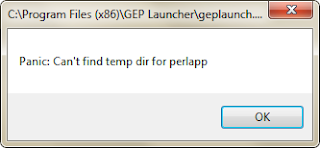
Perl: panic! or stay with Perl, and re-engineer? - No Programming language is perfect - Strongly Type Languages might NOT have less bugs

Image
GEP Launcher is/was some old x86 program, which was in an unfortunate manner, revealed to be written in Perl. Perl is a much maligned language, something like JavaScript, without the good parts. There is no compiler which in itself has the advantage to shorter iteration times during development, but then all checks and validations are performed only when the program is actually running. Originating in a lax kind of West Coast environment, Perl kind of "sits by the poolside" and lets you do what you want, no matter the consequences. A running joke is that almost anything can be interpreted by Perl: so, something like Regular Expressions, the code can be easy to write, but hard to read. And it's generally agreed that developers spend far more time reading than writing code.  Unfortunately for fans of particular programming languages, it is difficult to objectively measure the prevalence of bugs with a particular language. Reports abound of how buggy C++ projects tend to be,...

Outlook: Today, Today, Yesterday. Today ... - Application Quality as a Trade-off with Functionality (Productivity)

Image
Microsoft software, despite unfortunate products such as the CMD line envrionent (no-one who has switched to Unix or bash-on-Windows has ever complained!) - generally have high quality, considering the sheer range of hardware supported, the different product lines and their generations, and the millions of users, it is somewhat impressive that it mostly works. However, there is the odd slip-up which we helpfully point out in these pages: Timeless messages from classic code Like any engineering endeavor, there are trade-offs between cost and value, and so quality can at times suffer...

null++ and its alternatives - NULL as an anti-pattern and some alternatives - stateless functional code

Image
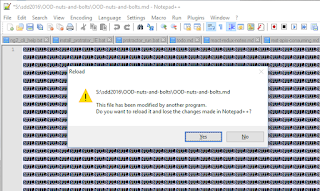
  Notepad++ is a great and free text editor with many practical features, such as line-sorting, multi-file and directory find-and-replace, and excellent encoding support. However, programming is hard, and even the noble Notepad++ has been caught off guard in the war on bugs:  To NULL or not to NULL... A display full of NULLs is not that desirable, but on the other hand is better than random, uninitialized data, or worse, reading beyond assigned buffers into memory regions containing data this user is not supposed to see.  The history of NULL is a controversial one: it was, somewhat like JavaScript, cheap to implement at the time and seemed a good idea. However, notoriously, even the inventor of NULL considers the invention to be a mistake . At first glance, and when used in a very limited scope, NULL seems a sensible construct: a global kind of default 'this is not set' value, that is reliably detectable, as opposed to some random memory garbage. Issues arise when the NU...

green screen of death - not just blue! - UX challenge of presenting severe error state and failure

Image
Windows aficionados will recall the blue screen of death - and it's not fun like the one they use in the movies. To the credit of the inventiveness of Microsoft engineers - the screens of death are not limited in their colors to the blue section of the visible electromagnetic spectrum. Should you be unlucky enough, and perhaps there is some Irish-American connection here, but you may also share the joy of experiencing not only the blue screen of death - but also the green:   Software innovation at its finest Oh to be a fly on the wall, when the UX, software devs and PMs were discussing this fine feature! The exact count of shades of green that Windows sports is a topic for more in-depth analysis, and may even be considered a trade secret... EU officials are investigating...

dotnet .NET out of memory - An extreme case of catastrophic failure or bad coding?

Image
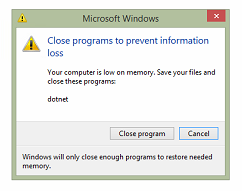
A rather unfortunate, and thankfully unusual errors is when the dotnet platform runs out of memory (most likely, in fairness to the large and so easy target that is Microsoft, not at all the fault of the behemoth, but that of the incumbent application...). Admittedly, this is an extreme case, given Windows paging mechanism, where the short-term volatile RAM of the computer can be artificially (how else?) extended by writing less-used data to disk - this extreme case, where even the paging-extensions are failing to acquire enough memory... User intervention required... Perhaps this is a case of catastrophic failure - although it seems less preventative, than already too late... So, would it have been simpler to close the offending process and show the user a suitable error message? The choice presented to the user seems enviable indeed... So, this seems less a case of preventative catastrophic failure, than lazy coding, where responsibility for a technical decision is dumped onto the u...

Lync - wait 15 minutes - Error handling, UX and automatic software updates: a bad example

Image
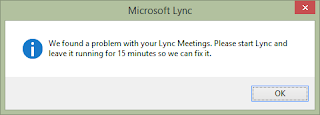
Not all issues are bugs, and not all issues take a long time to fix. Consider this example from Microsoft Lync (the posh Skype): Be right back... Unlike many other application boo-boos exemplified in this series, this one is a bit hard to explain. The message does admit there is a problem, and this is a modal dialog (absorbing all user input and so blocking any other part of the application from processing any new user actions). So, on the face of it, this appears an example of catastrophic failure . However, reading further through the message, we see that the user has a rather specific task to perform: restart and leave it running for 15 minutes . Restart does seem a little unfortunate and casual: we don't quite know what the problem is, but in fact we DO know the software is, like your aunt Wilma's old car, a bit unreliable, and just needs a bit of a kick and another try every now and then. Admitting to unreliability is unfortunate, yet the honesty is to be commended - hop...